
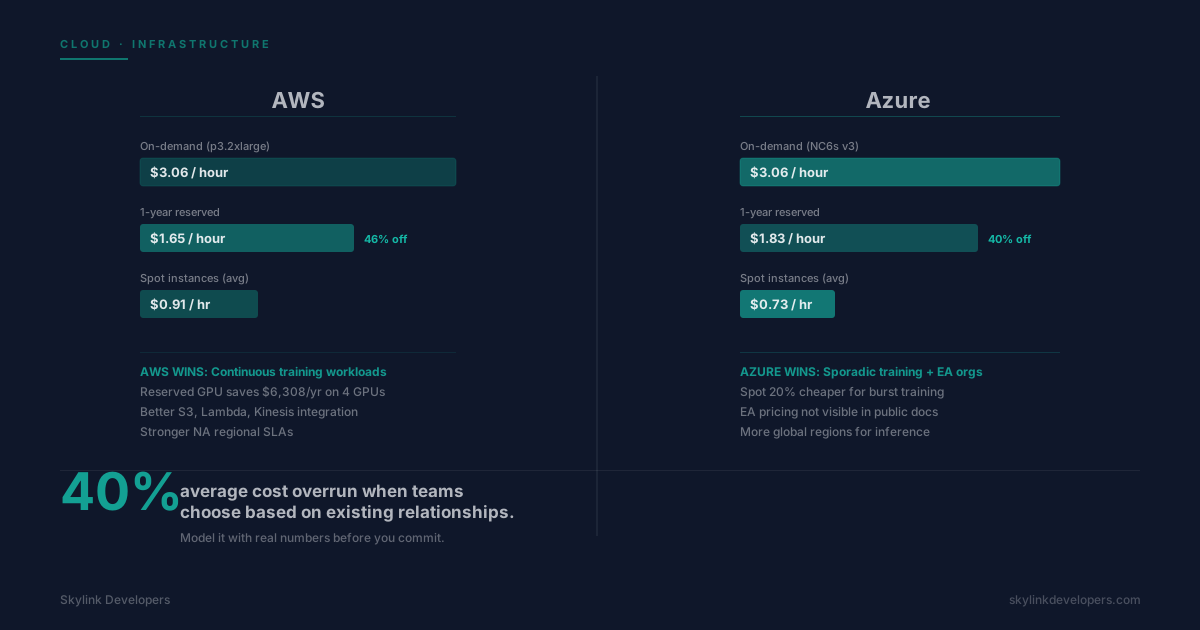
Most teams pick a cloud provider based on existing relationships, then discover they're overspending on AI workloads by 40% six months later. Here's the real cost breakdown.
The blog posts that compare AWS and Azure for AI workloads are written by cloud vendors and managed service providers. They compare services neither platform sells at list price, ignore egress costs, and don't model the difference between training workloads and inference workloads. The result: most engineering teams make the decision based on existing relationships and discover they're overspending by 40% six months into production.
Training or Inference? The Question Nobody Asks First
AWS and Azure are different value propositions depending on whether your bottleneck is model training or model inference. For training: AWS wins on GPU instance variety and reserved pricing. For inference at scale: Azure wins on managed endpoints and regional distribution. The mistake is choosing a cloud for training and then running inference there by default without modeling the costs separately.
GPU Instance Pricing: What the Docs Don't Say
AWS p3.2xlarge (1x V100, 16GB): $3.06/hour on-demand. Azure NC6s v3 (1x V100, 16GB): $3.06/hour on-demand. Identical at list price. The difference is in reserved pricing. AWS 1-year reserved p3.2xlarge: $1.65/hour (46% discount). Azure 1-year reserved NC6s v3: $1.83/hour (40% discount). Over a year of continuous training, AWS saves $1,577 per GPU. With 4 GPUs: $6,308/year saved by choosing AWS reserved over Azure reserved.
For sporadic training with spot instances, the math reverses. AWS Spot p3.2xlarge averages $0.91/hour. Azure Spot NC6s v3 averages $0.73/hour. Sporadic training on spot: Azure is cheaper by 20%. The right answer depends on your training schedule, not the headline price.
Cold Start Penalties: The Inference Cost Nobody Models
Inference endpoints that scale to zero save money when idle and cost you conversion when they wake up. AWS Lambda cold starts for ML inference containers average 4–8 seconds. Azure Container Instances cold starts: 6–10 seconds. Neither is acceptable for a customer-facing AI feature. Both providers offer always-on reserved capacity: AWS SageMaker real-time endpoints start at $0.10/hour, Azure ML managed online endpoints at $0.086/hour. For a product that needs inference 24/7, model this as an always-on cost. The $122/month difference across 20 endpoints is $2,440/year — real, but not the deciding factor.
Data Egress: The Hidden Bill That Arrives in Month 3
AWS data transfer out to the internet: $0.09/GB for the first 10TB/month. Azure: $0.087/GB. Nearly identical. The difference appears with inter-region transfer. AWS charges $0.02/GB. Azure charges $0.02/GB same-continent. If your pipeline reads training data from S3 in us-east-1, trains in us-west-2, and serves inference in eu-west-1, you're paying inter-region egress at every hop. A team running a 1TB/day pipeline across three AWS regions pays $600/month in egress alone — a cost that appears in zero 'AWS vs Azure' comparison posts.
Managed ML: SageMaker vs Azure ML
Both SageMaker and Azure ML charge roughly a 30% premium over raw compute for the managed layer. The question isn't which is cheaper — they're close. It's which your team will actually use. SageMaker integrates better with AWS services (S3, Lambda, Kinesis). Azure ML integrates better with Microsoft tooling (DevOps, Active Directory, Power BI) and enterprise procurement for organizations already on Microsoft EA. Don't pay the 30% managed premium for either service unless your team lacks the MLOps capacity to manage raw infrastructure.
The Hybrid Approach That Actually Works
Train on AWS Spot GPU instances (lowest sporadic training cost). Serve inference on Azure managed endpoints (lower always-on pricing plus Microsoft EA discounts). Use Terraform to manage both. This saves 18–24% versus committing to a single provider for all workloads.
The 5-Question Decision Matrix
Answer these before committing to a provider: (1) Do you already have significant infrastructure on one provider? Stay there unless the cost delta exceeds $50K/year. (2) Is your training continuous or sporadic? Continuous: AWS reserved GPU wins. Sporadic: Azure Spot wins. (3) Are you on a Microsoft Enterprise Agreement? Azure ML is often cheaper due to EA pricing not in public docs. (4) Do you need inference in more than 3 regions? Azure has more global regions. (5) Does your team have MLOps capacity? No: use managed services. Yes: use raw compute and save 30%.
Frequently Asked Questions
Yes. Build a spreadsheet: (compute hours × instance rate) + (data transferred GB × egress rate) + (storage GB × rate) + (managed service premium). Run three scenarios: current volume, 3x volume, 10x volume. Neither AWS nor Azure's official calculators model cross-region egress accurately for AI pipelines — do it manually.
Frequently Asked Questions
For most teams: no. Multi-cloud adds Terraform state management across providers, separate IAM systems, and different logging stacks — overhead that costs more in engineering time than it saves in compute. The exception is when you have a training workload that genuinely fits AWS Spot economics and an inference workload that genuinely fits Azure EA pricing. In that case, Terraform plus a single observability stack (Datadog or Grafana Cloud) makes it manageable.
Frequently Asked Questions
Three actions under a week: (1) Move any training jobs without guaranteed-capacity requirements to Spot/Preemptible instances — average saving 65%. (2) Scale inference endpoints to zero during off-peak hours if SLA allows — average saving 40% of endpoint costs. (3) Move model artifacts to infrequent-access storage tiers — average saving 60% of storage costs. These three changes typically save 25–35% of a total cloud AI bill without touching your architecture.
The right cloud for your AI workloads isn't the one with the best marketing. It's the one that fits your training schedule, your team's operational capacity, your existing procurement contracts, and the regions where your users actually are. Model it with real numbers before you commit.